
This guide outlines the steps to upgrade the BSK PDF Manager plugin from legacy versions to the latest release. Follow the instructions carefully to ensure a smooth transition and avoid data loss.
This guide is for versions 2.0 and above. If you are using a version lower than 2.0, please contact us.
Step 1: Upgrade to Version 2.5 (If Using a Version Below 2.5)
If your current version is below 2.5, you must first upgrade to version 2.5
Upgrading to version 2.5
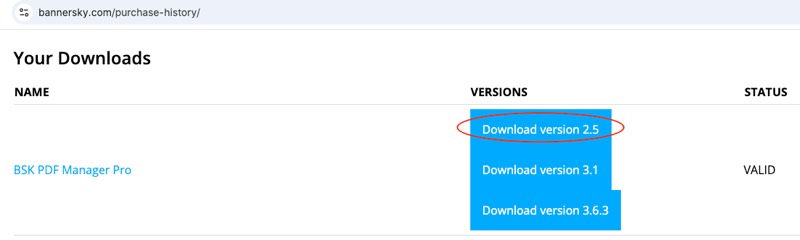
- Download the 2.5 version package from https://bannersky.com/purchase-history/
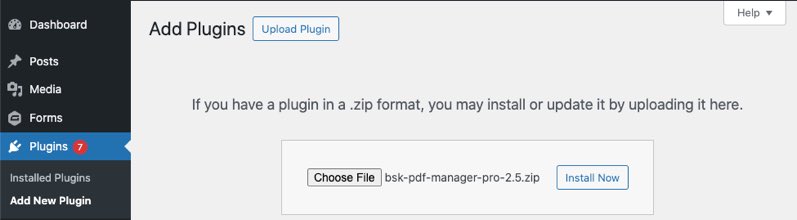
- Go to your WordPress --> Dashboard --> Plugins --> Add New-->Upload
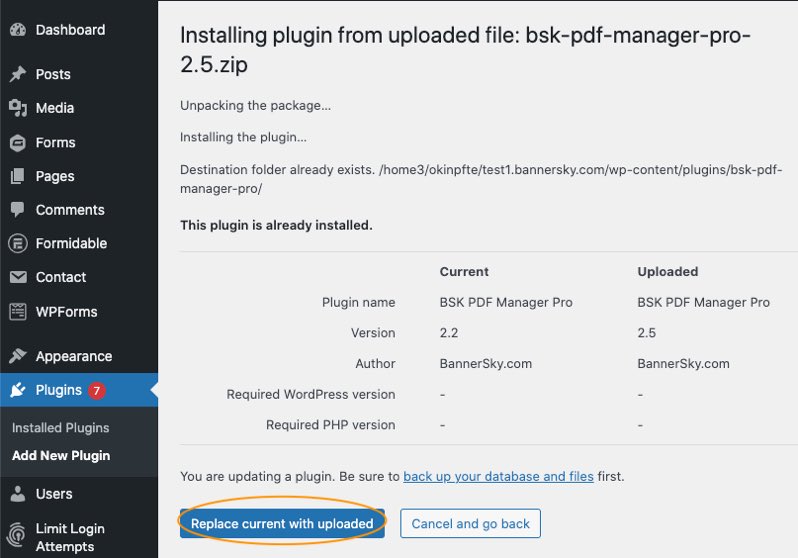
- Remember to select "Replace current with uploaded"
After upgrading to version 2.5 you need to update your PDF display shortcodes as follows:
Shortcode Updates for PDF Display
- Replace old PDF shortcodes:
- Old:
[bsk-pdf-manager-pdf id='...'] - New:
[bsk-pdfm-pdfs-ul id='...']
- Old:
- Update shortcode attributes:
Old Attribute New Attribute linkonlylink_onlyorderbyorder_byorderordertargettargetshowallid="ALL"mosttopmost_topfeaturedimagefeatured_imagefeaturedimagesizefeatured_image_sizeshowpdftitleshow_pdf_titlenofollowtagnofollow_tagshowdateshow_datedateformatdate_format - Special cases:
- If your shortcode includes the
orderedlistattribute, use[bsk-pdfm-pdfs-ol id='...']instead. - If your shortcode includes the
dropdownattribute, use[bsk-pdfm-pdfs-dropdown id='...'].
- If your shortcode includes the
Shortcode Updates for Category Display
For category-related shortcodes, make the following changes:
- Replace old category shortcodes:
- Old:
[bsk-pdf-manager-list-category id='...'] - New:
[bsk-pdfm-category-ul id='...']
- Old:
- Update attributes:
Old Attribute New Attribute linkonlylink_onlyorderbyorder_byorderordertargettargetshowcattitleshow_cat_titleshowoptionnoneoption_nonemosttopmost_topfeaturedimagefeatured_imagefeaturedimagesizefeatured_image_sizeshowpdftitleshow_pdf_titlenofollowtagnofollow_tagshowdateshow_datedateformatdate_format - Special cases:
- For
orderedlist, use[bsk-pdfm-category-ol id='...']. - For
dropdown, use[bsk-pdfm-category-dropdown id='...'].
- For
Updates for Category Selector Shortcodes
If you use category selectors to display PDFs, modify your shortcodes as follows:
- Replace the selector shortcode:
- Old:
[bsk-pdf-manager-list-selector ...] - New:
[bsk-pdfm-selector-ul cat_id="all" ...]
- Old:
- Update attributes:
Old Attribute New Attribute defaultiddefault_cat_idselectoroptionnoneselector_option_noneexcludeidexclude_cat_idOther attributes follow the same mappings as above. - Special cases:
- For
orderedlist, use[bsk-pdfm-selector-ol id='...']. - For
dropdown, use[bsk-pdfm-selector-dropdown id='...'].
- For
Step 2: Upgrade to Version 3.1 (If Using a Version Below 3.1)
- After upgrading to version 2.5, proceed to version 3.1.
- Reactivate the plugin:
- Deactivate the BSK PDF Manager plugin from your WordPress dashboard.
- Reactivate it immediately.
- Do not delete the plugin, as this will result in permanent data loss.
Step 3: Upgrade to the latest version
- After upgrading to version 3.1, proceed to the latest.
Important Notes
- Double-check all shortcodes and attributes after upgrading to avoid functionality issues.
- Test your site thoroughly post-upgrade to ensure compatibility.
- Backup your database and files before performing major updates.
By following these steps, you can seamlessly upgrade BSK PDF Manager to the latest version while preserving your data and functionality.